NIB — Visual 2D & 3D Game Editor
A downloadable Game Engine for Windows, macOS, and Linux
Stable update: NIB 1.0.1 is available. See the release notes and upgrade guidance. The trailer and existing demo videos show NIB 1.0.0.
Make a world. Give it rules. Let someone play.
NIB is a free visual editor and game engine for building 2D and 3D games. Assemble scenes, edit materials, author characters and effects, write JavaScript gameplay, test in Play and export a game people can run in their browser. NIB 1.0.1 is the current stable maintenance release. It fixes 40 confirmed issues in project safety, editing, animation, physics, rendering and export, without changing project or asset formats.
Start from an empty scene or one of ten complete small games. Keep direct control through the Hierarchy, Inspector and specialized editors. If you prefer an AI-assisted workflow, connect a compatible local MCP client to the shipped server's 62 tools.
Free for personal, educational and commercial games. No mandatory subscription. No royalties. Donations are optional. NIB's engine/editor is proprietary; your original game code and assets remain yours.
From scene to playable game
- Build: organize entities, components, lights, models, sprites and prefabs in the visual editor.
- Give it rules: use built-in controllers and write JavaScript scripts with editable Inspector parameters.
- Give it character: author rigs, clips, animation states, layered VFX, spatial audio and game UI.
- Test: use Play/Stop, the Console and Profiler; verify your exported build on its intended devices.
- Share: export Single HTML or a Web Project ZIP. An optional Windows x64 packager can wrap a Single HTML game in Electron.
What you can build — and what makes it possible
- 2D platformers: sprites and frame animation, platformer control, double jump, camera following, collisions, parallax and editable UI.
- FPS and exploration: first-person movement, pointer lock, raycasts, scripted interaction, animated models, spot lights, fog and spatial sound.
- Racing: arcade vehicle control, chase cameras, checkpoints, lap timing and scripted rules.
- Action and RPG prototypes: grid navigation, character clips/state graphs, combat scripts, sensors, effects, loot and menus.
- Physics puzzles: Rapier rigid bodies, colliders, joints, sensors and raycasts.
- Card, board and casual games: sprites, text, mouse/touch input, UI layout and JavaScript rules.
- Stylized worlds: PBR materials, terrain and foliage, painted surfaces, post-processing and retro rendering.
These are supported building blocks and working examples. Larger systems such as quests, inventory or progression are authored in your game's scripts.
Build and organize
Assemble levels and reusable objects, inspect their properties, then test the scene without losing your editing state.
Scene hierarchy and parent/child transforms; Entity names, tags and enabled state; Inspector and component editing; 2D and 3D viewports; Move, rotate and scale gizmos; Selection, duplication and deletion; Undo and Redo; Reusable linked prefabs; Apply prefab changes to instances; Folder projects with scenes, scripts and assets; Browser-storage workspace; Save, close and reopen projects; Separate Play/Stop runtime scene.
Game logic and controllers
Write the rules for a platformer, shooter, racing game, puzzle or RPG with JavaScript and reusable gameplay components.
JavaScript script editor; Script lifecycle and fixed-step updates; Script parameters exposed in Inspector; Script reload during development; First-person controller; Arcade vehicle controller; 2D platformer controller; 2D top-down controller; Chase camera and 2D follow camera; Scene, input, physics and audio APIs; Triggers, sensors and scripted interaction; Property Timeline and keyframes; Number, vector, quaternion and color tracks; Localized text and localization APIs.
2D graphics
Create animated characters, layered worlds, parallax scenes and a HUD over either a 2D or 3D game.
Sprites, texture regions and atlases; Sprite origins, tint and opacity; Sprite layers and blend modes; Frame-based sprite animation; World-space and screen-space sprites; Multiline Text2D; 2D particles; Camera zoom and rotation; Compatible sprite batching; Screen HUD outside world post-processing.
Menus and game UI
Author title screens, pause menus, HUDs and interactive buttons that work in Play and exported games.
UI Canvas and UI Element components; Editable text, panels and buttons; Anchors and offsets; Row, column and grid layouts; Screen scaling; Keyboard, pointer, touch and gamepad focus; Focus navigation and activation; Script events and level actions; UI saved with the scene; Same authored UI in both web exports.
Input and accessibility of controls
Map gameplay actions to keyboard, mouse, touch and gamepad, then adapt the controls for your intended devices.
Keyboard and mouse input; Pointer lock for first-person look; Named remappable input actions; Gamepad buttons and axes; Touch joystick and action buttons; Saved input configuration; Action state access from scripts; Focus and pause handling.
Rendering and materials
Build stylized or PBR scenes with native WebGL2/WebGPU rendering and inspect which backend is actually running.
Native WebGL2 renderer; Native WebGPU renderer; Auto selection and fallback diagnostics; Perspective and orthographic cameras; Primitive and mesh geometry; PBR materials; Color, normal and roughness textures; Texture sampling controls; Vertex colors; Transparency and double-sided surfaces; Depth and blend controls; Clearcoat, sheen and anisotropy controls; Transmission and water-related surface controls.
Light and atmosphere
Light indoor and outdoor environments with sun, point/spot sources, environment maps, fog and sky controls.
Directional light; Point lights; Spot lights; Supported directional/spot shadow maps; Environment lighting; HDRI environments; Procedural skies; Fog color and range; Configurable render quality and shadows.
Post-processing and retro style
Shape the look with cinematic screen effects or deliberately low-resolution, PS1-inspired rendering.
Bloom; SSAO; Floor-oriented screen-space reflections; Depth of field; God rays; Heat distortion; LUT color grading; FXAA; Exposure, vignette, grain and color controls; Pixelation and color quantization; Dithering and retro framing; Vertex snapping and affine-texture styling.
World building
Sculpt terrain, paint layered surfaces and scatter vegetation or props with varied transforms.
Heightmap terrain creation; Raise, lower and smooth terrain; Terrain surface textures; Surface-aware footprints; Four-layer mesh Surface Paint; Procedural or imported surface textures; Imported texture normal maps; Foliage and prop scattering; Varied position, rotation and scale; Frustum culling; Compatible mesh instancing; Generated mesh LODs.
Physics and character movement
Make platforming, collision, trigger and rigid-body interactions; use Rapier for richer 3D experiments.
Built-in 2D rectangle/circle physics; Static, dynamic and kinematic 2D bodies; 2D sensors, grounded checks and raycasts; Built-in simple 3D physics; Bundled Rapier 3D backend; Box, sphere and capsule colliders; Convex-hull and static triangle-mesh colliders; Rigid-body joints; Body sleeping and CCD options; 3D sensors and raycasts; Upright character controller; Slope limits and stepping; Ground snapping, gravity and jumping; Physics validation and movement ownership diagnostics.
Navigation
Drive click-to-move characters or enemies over a baked grid, with obstacle handling and failure diagnostics.
XY and XZ grid baking; Grid path search; Obstacle detection and saved bake settings; Navigation agent components; Click-to-move or scripted destinations; Parent-aware world movement; Bounded nearest-cell search; Optional local agent steering; Blocked-origin and path failure diagnostics.
Models and asset import
Bring your licensed art into a project with model hierarchies, materials, textures, skeletons and animation clips.
glTF/GLB model import; Self-contained GLB workflow; Model hierarchy and supported materials; Texture and audio asset import; Imported skeletons and clips; MASK alpha and selected UV set; CPU morph targets; STEP, LINEAR and CUBICSPLINE animation; Import report and retry failed assets; Unsupported required-data repair messages.
Character and animation tools
Prepare rigs, edit weights, author clips and state graphs, then map motion between compatible skeletons.
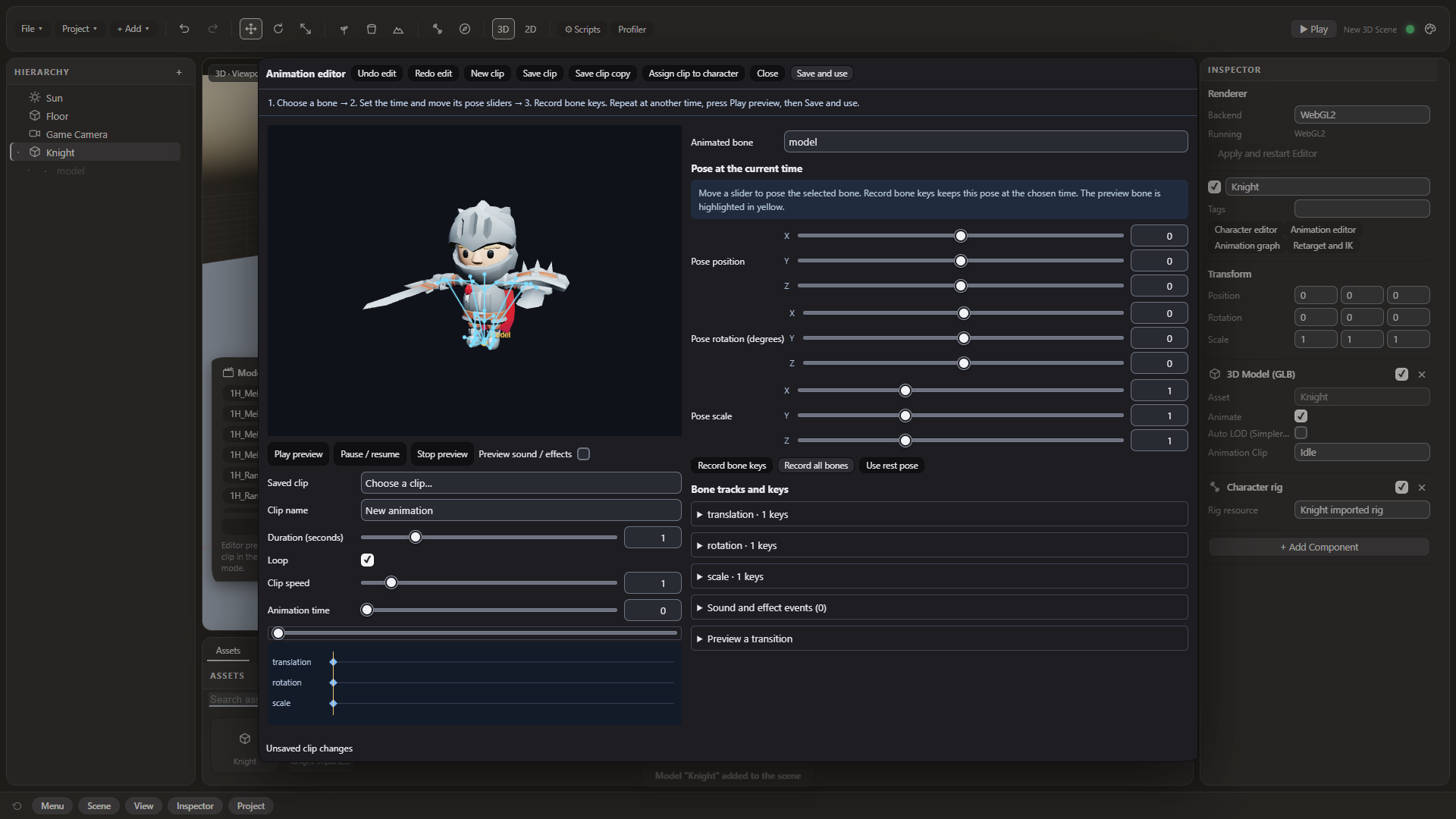
Character editor; Adopt an imported skeleton; Upright T-pose humanoid fitting; Custom skeleton authoring; Bone and skin-weight editing; Deformation preview; Reusable saved rig resources; Animation editor and bone keyframes; Clip preview and reusable clip resources; Clip playback and blending; Timed VFX and audio animation events; Animation state graphs; Typed parameters, conditions and priority; Exit times and crossfades; Isolated interactive graph preview; Explicit bone mapping for retargeting; Rest-pose and axis corrections; Scaled motion transfer; Manual two-bone IK targets and poles; Foot-contact intervals and world planting; Up to 256 bones within the asset/backend contract.
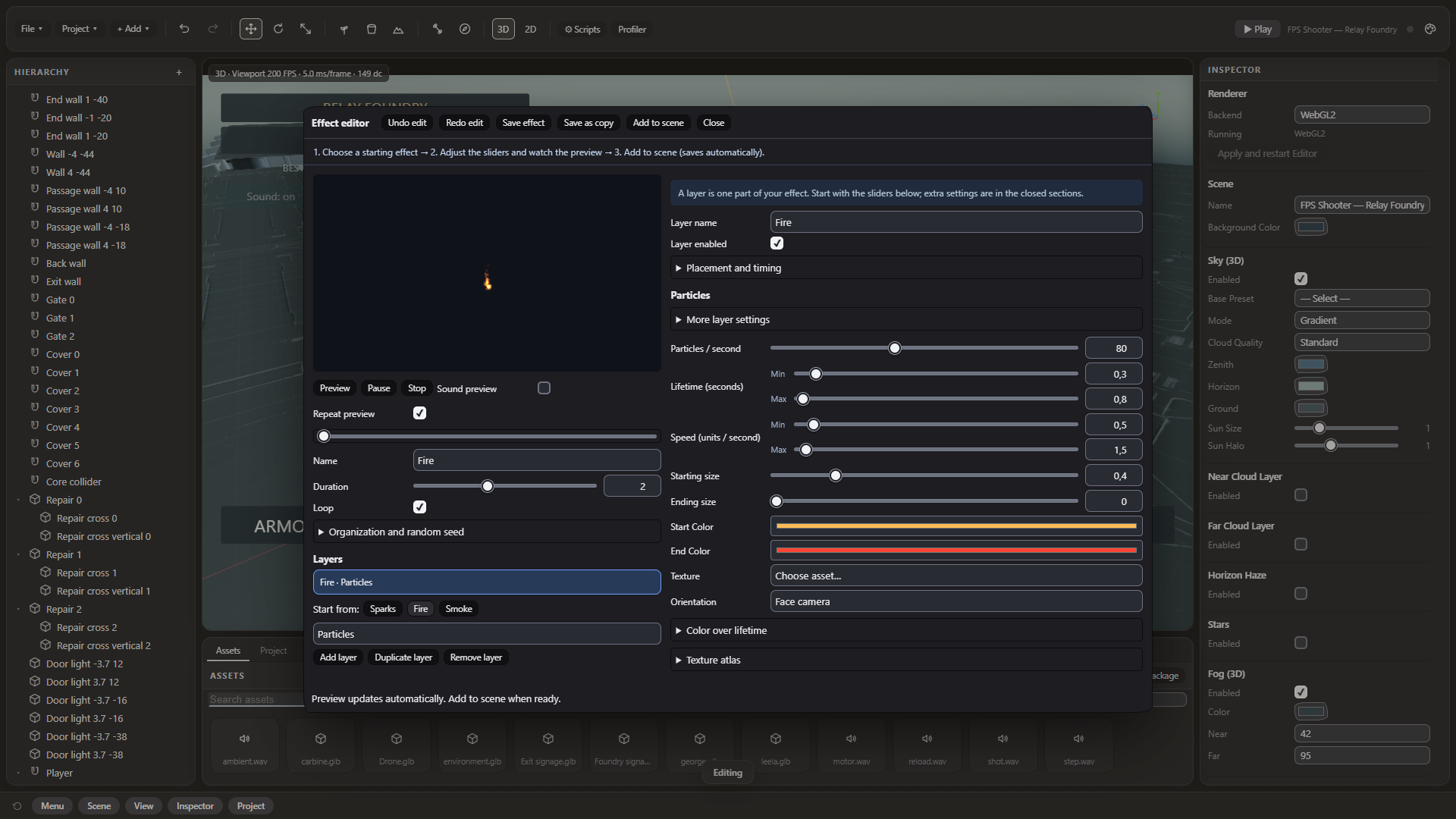
Effects authoring
Design reusable layered effects, preview them, and trigger them from game scripts or animation events.
Compound Effect editor; Particle layers; Geometry, trail, light and audio layers; Layer curves and lifetime controls; Effect preview and reusable .nibfx resources; Procedural particle textures; Particle flipbooks; Particle color/size changes; Soft particle intersections; Procedural flame; Supported surface VFX; Displacement-sampled trails; Script and animation-event triggering; Prepared effect package import; Saved effect validation and Undo.
Sound and music
Mix music, spatial effects and ambient zones, with audition tools inside the editor.
Web Audio sound playback; Spatial audio sources and listener; Music playback and crossfades; Ambient sound zones; Audio mixer buses; Volume, mute and bus audition; Filters and reverb; World-space ambient zone map; Decoded sound assets; Browser-media streaming for long music; Audio from scripts and animation events.
Levels, loading and recovery
Build multi-level projects, load declared dependencies with progress, and recover from cancelled or failed transitions.
Multiple scenes and configured startup scene; Go to, back, reload and retry level APIs; Per-level declared resources; Isolated candidate level construction; Staged loading progress; Cancel loading; Retry failed level or continue current level; Release previous level after successful transition; Source-payload budgets; Texture size and RGBA8 estimate budgets; Warn/continue or block-load policy; Cooperative work batches; Verified full project snapshots; Backups and Recovery interface; Restore into a new project copy; Automatic upgrade snapshots.
Diagnostics and profiling
Inspect script errors and measure simulation/render work, while keeping unavailable GPU metrics clearly identified.
Editor Console; Viewport frame and draw statistics; Profiler in Edit and Play; CPU render-submit measurement; Simulation measurement; Optional WebGPU timestamp queries; WebGL2 timer queries when available; WebGPU logical resource ledger; Sample status and frame identity; Measured-sample min/p50/p95/max; Save profiling JSON; Backend choice and fallback reason.
Local MCP automation
Let a compatible MCP client inspect the project, author changes, test Play and export, using 62 tools in the shipped local server.
62 tools verified with the release server tools/list; Project and scene inspection; Entity, component and script authoring; Asset, prefab and rig operations; Terrain and foliage authoring; Effect read/validate/save/instantiate/import; Timeline track and keyframe operations; Audio inspection and bus controls; Screenshots and Play test reports; HTML/ZIP export tools; Bounded batch operations; Local stdio transport and loopback bridge; Optional separately configured AI client.
Publish and share
Export playable web games and optionally wrap a Single HTML build as a portable Windows x64 application.
Single HTML game export; Embedded game runtime and resources; Web Project ZIP export; Pinned web build configuration; All folder-project levels in web exports; Scene-bundled multi-level campaigns; Missing-resource export report; Required runtime and third-party notices; Hosted games need no NIB/Node.js on player devices; Optional Windows x64 Electron packager; Portable unsigned game application.
Ten playable starting points
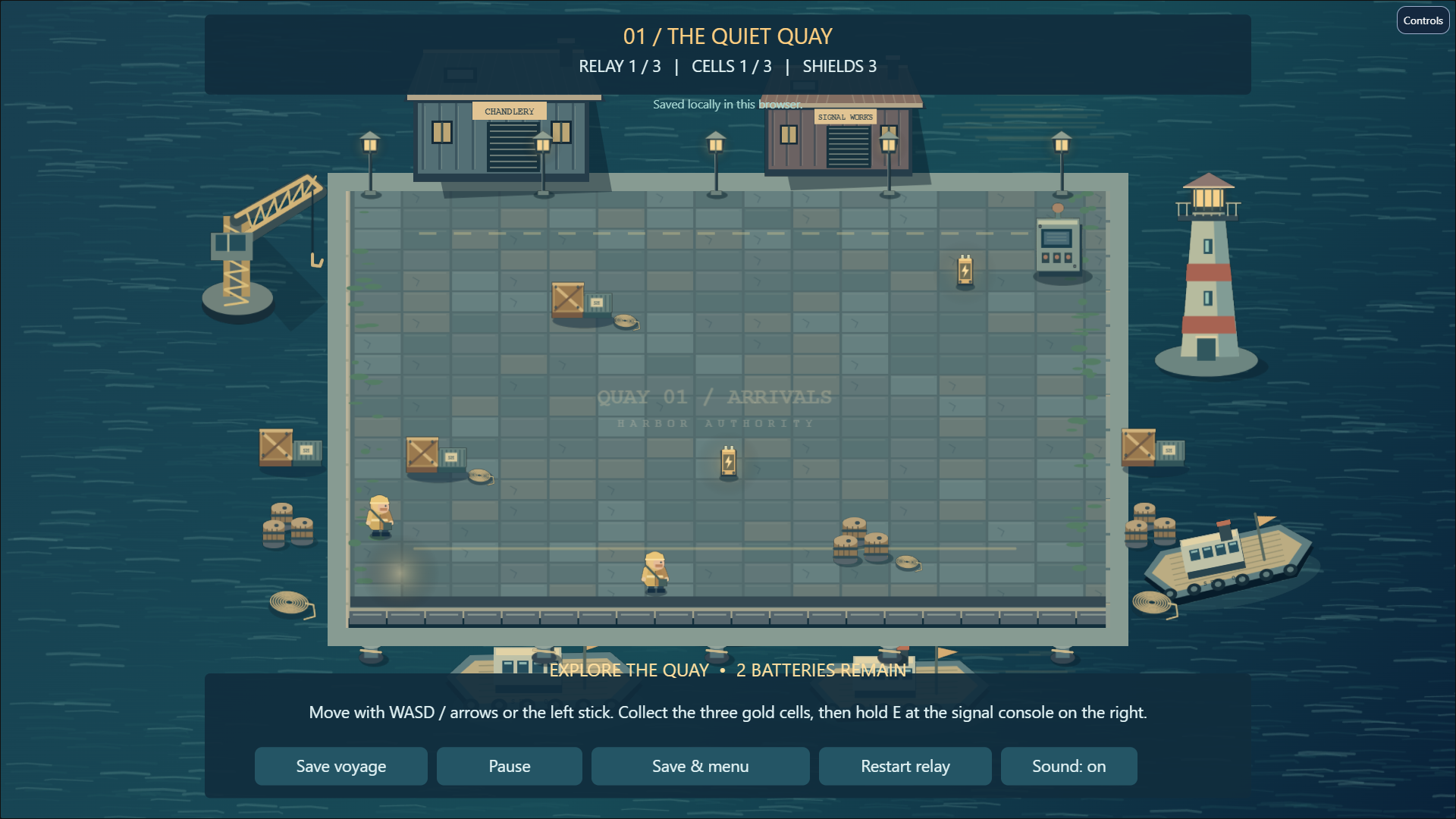
- Signal Harbor — An illustrated five-level campaign: relays, local save/continue, menus and a lighthouse ending.
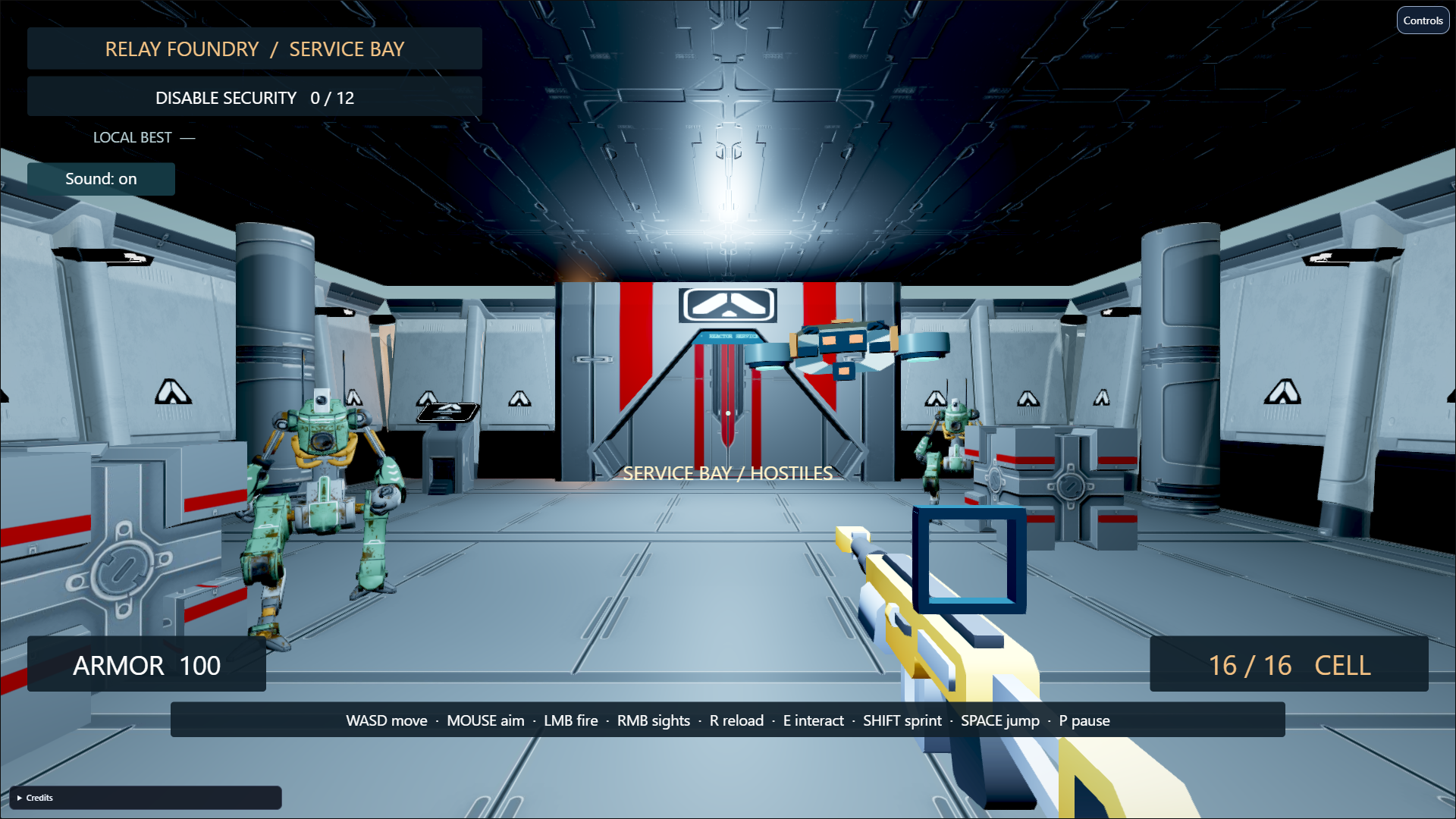
- Relay Foundry — A three-sector FPS mission with animated security mechs, cover, reload, consoles and extraction.
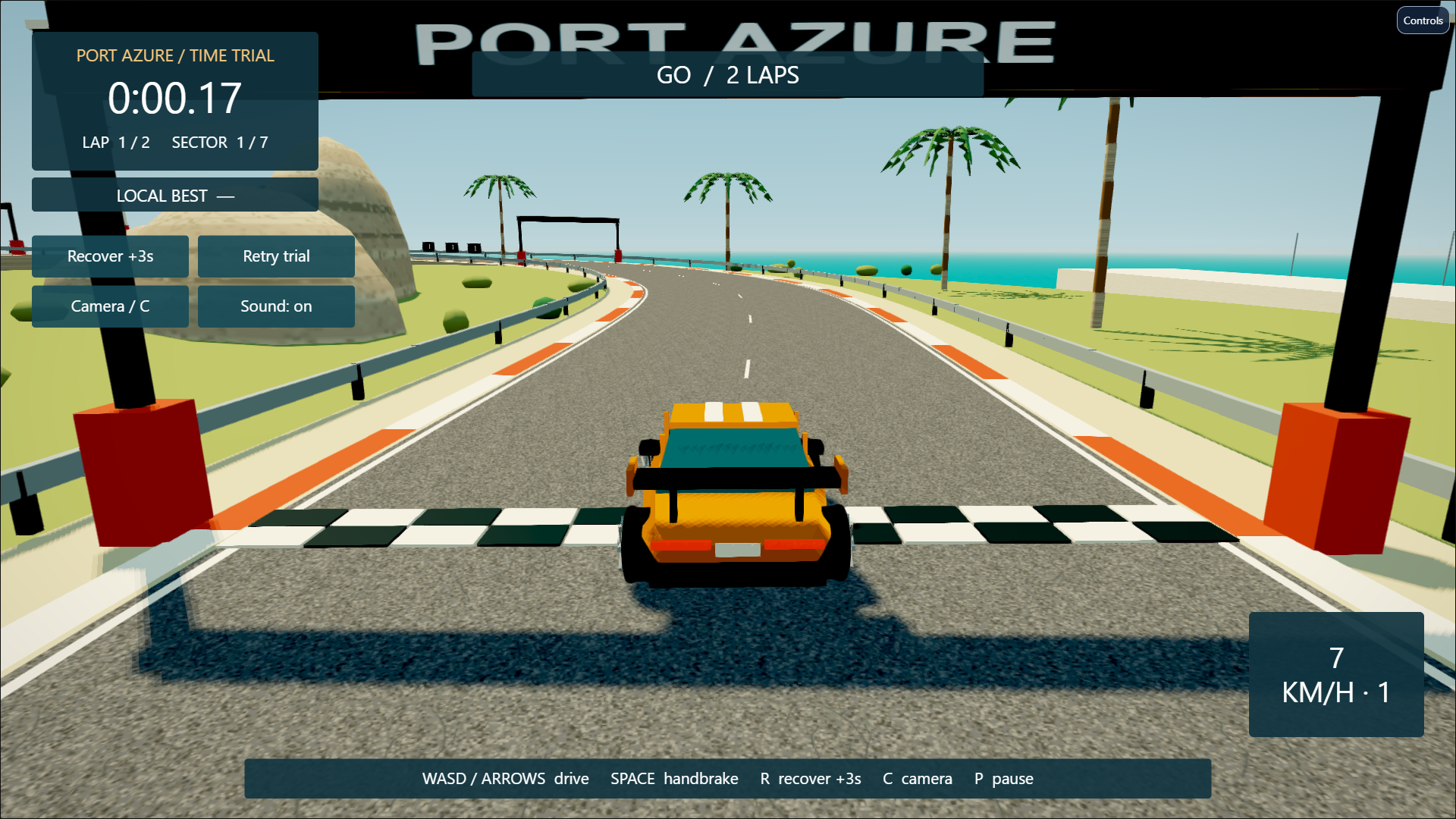
- Port Azure — A coastal arcade time trial with a detailed GT car, two laps, alternate cameras and a local best.
- Courier’s Wake — A layered 2D platform route with double jump, dash, checkpoints, hazards and a train finale.
- The Velvet Table — A complete card game with three target columns, exchanges, medals and replay.
- Tinker Yard — A Rapier workshop with dominoes, a cargo pendulum and a bowling lane.
- Emerald Reach — A tropical helicopter rescue with weapons, winching, navigation and return to base.
- The Drowned Reliquary — An action dungeon with animated combat, navigation, dodge, loot and a boss.
- The Last Shift — A horror escape with first-person exploration, fuse collection, pursuit and emergency light.
- Emberwatch — A top-down courtyard battle with enemy waves, dash, pulse, objectives and a boss.
Also included: six rendering/animation showcases — Retro/PS1, Blade Showcase, Biome Footprints, Rig Showcase, Real PBR Textures and Real Foliage — plus Empty 2D and Empty 3D.
MCP: optional automation, with a visible editor
The local stdio server lets a compatible client inspect the current project, create objects, edit components/scripts, work with prefabs/rigs/effects, sculpt terrain, author timeline keys, inspect sound, capture screenshots, run Play tests and export. Read the scene, make a bounded change, inspect it and test it. The full release server catalog contains 62 tools.
NIB does not include a paid AI subscription or promise that a prompt automatically becomes a finished game. A client and any AI provider are configured separately. Keep the editor/bridge local and connect clients you trust.
Download and start
- Install Node.js 22.12 or newer; Node.js 24 LTS is the release's recommended setup.
- Download NIB-1.0.1.zip and extract the whole archive into a writable folder.
- On Windows, run start.bat. On macOS/Linux, run sh start.sh.
- Keep the server running and open http://localhost:8670/editor/ in a desktop Chromium browser.
No Git checkout, build step or npm installation is required to run the compiled editor. Players of a hosted export need neither NIB nor Node.js.
Current scope
The editor initially targets desktop Chromium browsers. WebGPU depends on your browser, GPU and project; WebGL2 remains available. Validate exports on every target device. Windows packages are portable unsigned x64 Electron applications.
There is no built-in multiplayer/cloud backend, automatic anatomical retargeting, full-body IK, polygon navmesh editor, complete vehicle physics, mobile/store packaging or console deployment. Motion blur is not a completed rendering feature. SSR is floor-oriented; light/shadow budgets and other screen-effect limits are documented. The private source's framework adapters and npm SDK are not supplied as a public SDK in this release.
Your game is yours. Help NIB grow.
Personal, educational and commercial games are free under the NIB license. Distribute the permitted runtime inside your game and preserve the required license/third-party notices. The standalone engine/editor may not be rebranded or redistributed without permission. Your original game code and assets remain yours.
Optional donations support continued development. They do not buy ownership, a different license or a guaranteed feature/release date. Testing, clear bug reports and sharing what you create also help the project.
Report a bug · Ask a question, suggest a feature or show your game · Documentation · Official release
Created and owned by Murad Mammadov, CEO of ProjectAI, Azerbaijan.
Assets and credits
Katana models generated with Meshy AI — CC BY 4.0. Source exports supplied by MooradXO; geometry and textures were modified for NIB. CC BY 4.0. Starter asset sources and notices are included in the release credits.
Download
Install instructions
Getting started with NIB 1.0.1
- Install Node.js 22.12 or newer. Node.js 24 LTS is recommended: https://nodejs.org/en/download
- Download NIB-1.0.1.zip and extract the entire archive into a folder where you can save files.
- Open the extracted NIB folder: • Windows: double-click start.bat. • macOS/Linux: run sh start.sh from that folder.
- Keep the server running. Open this address in desktop Microsoft Edge or Google Chrome: http://localhost:8670/editor/
- To try a starter game, open File → New Scene (Genres), choose a preset, confirm Create and press Play.
- Save your own project before closing the editor. You can export your game as a Single HTML file or a Web Project ZIP.
No Git checkout, build step or npm installation is required to run the supplied editor.
Players of a hosted exported game do not need NIB or Node.js installed.
Before upgrading, save and close your project. Back up the entire projects folder outside the installation and extract 1.0.1 into a separate writable folder. Copy the backed-up projects and verify Save, reopen and an independent game export before removing the old installation. Browser-storage projects must first be saved through the project workflow; copying the projects folder does not copy browser storage.
Questions and help: https://github.com/MooradXO/NIB-Editor/discussions
Development log
Leave a comment
Log in with itch.io to leave a comment.